> ## Documentation Index
> Fetch the complete documentation index at: https://docs.firmhouse.com/llms.txt
> Use this file to discover all available pages before exploring further.
# Tiered discounts for multiple products
> Set up tiered discounts in Firmhouse so higher discount percentages can apply automatically or through discount codes when subscribers add more eligible products.
Use tiered discounts to automatically apply a higher discount when a customer has more eligible subscription products.
> **Note:** This is a preview feature that has to be enabled by the Firmhouse team on your project. Please get in touch if you'd like to set up Tiered Discounts.
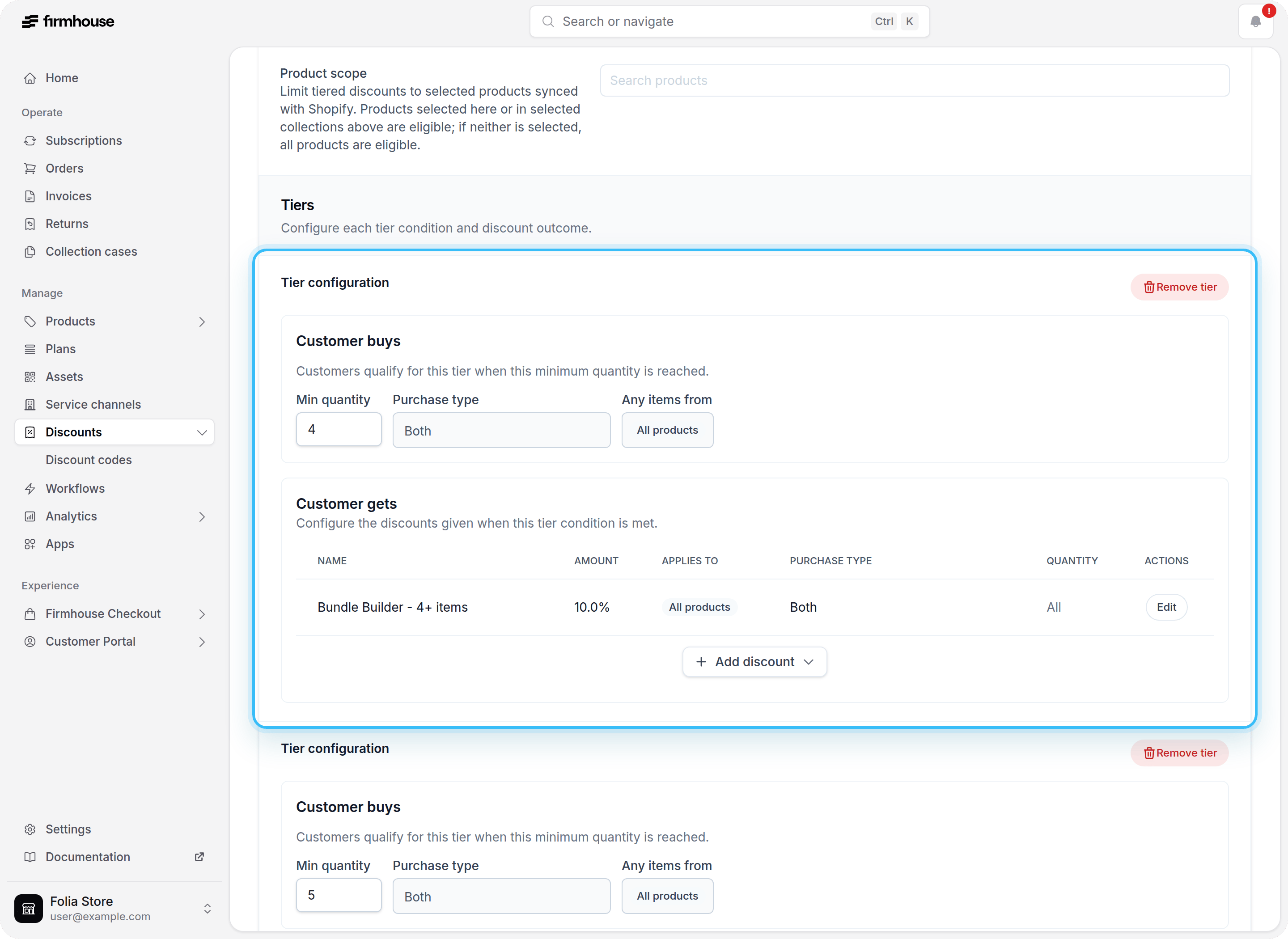
## 1. Create a Tiered Discount in Firmhouse Portal
1. Go to **Discounts** in your Firmhouse portal.
2. Create a new **Discount** (or edit an existing one).
3. Enable **Enable discount tiers**.
4. Add one or more tiers:
* Set **Minimum quantity**.
* Set **Discount percentage**.
5. Optionally add a **Collection scope** to limit which products count toward the tier quantity.
6. Optionally select one or more **Customer segments** to limit the Shopify checkout discount to specific Shopify customer segments.
7. Save the discount.
 ## 2. Choose how customers should receive the discount
Tiered discounts can work in two ways:
* **Automatic**: Enable **Automatic** so the discount applies as soon as the cart quantity matches a tier. Customers do not need to enter a code.
* **Manual with a discount code**: Keep the discount **Manual** if you want customers to enter a discount code at checkout. After saving the tiered discount, create a Firmhouse discount code for it from **Discount Codes**. The code is synced to Shopify, but it only becomes redeemable after the tiered discount is activated.
## Add one-time gifts to a tier
Each tier can also include one-time purchase gifts.
When you add a gift row to a tier, you can target:
* specific one-time purchase products
* one or more collections
If you target collections, Firmhouse uses the eligible one-time purchase products in those collections when the tier is applied.
## Test a tiered discount with a Shopify customer segment
You can use Shopify customer segments to test a tiered discount with a limited group before opening it to every customer.
1. Create a customer segment in Shopify that includes only your test customers.
2. Select that segment in the **Customer segment** field on the Firmhouse tiered discount.
3. Save and activate the tiered discount.
4. Test checkout with a customer account that belongs to the selected Shopify segment.
Only customers in the selected segment can receive the Shopify checkout discount. Remove the selected segment when you are ready to make the discount available to all eligible customers.
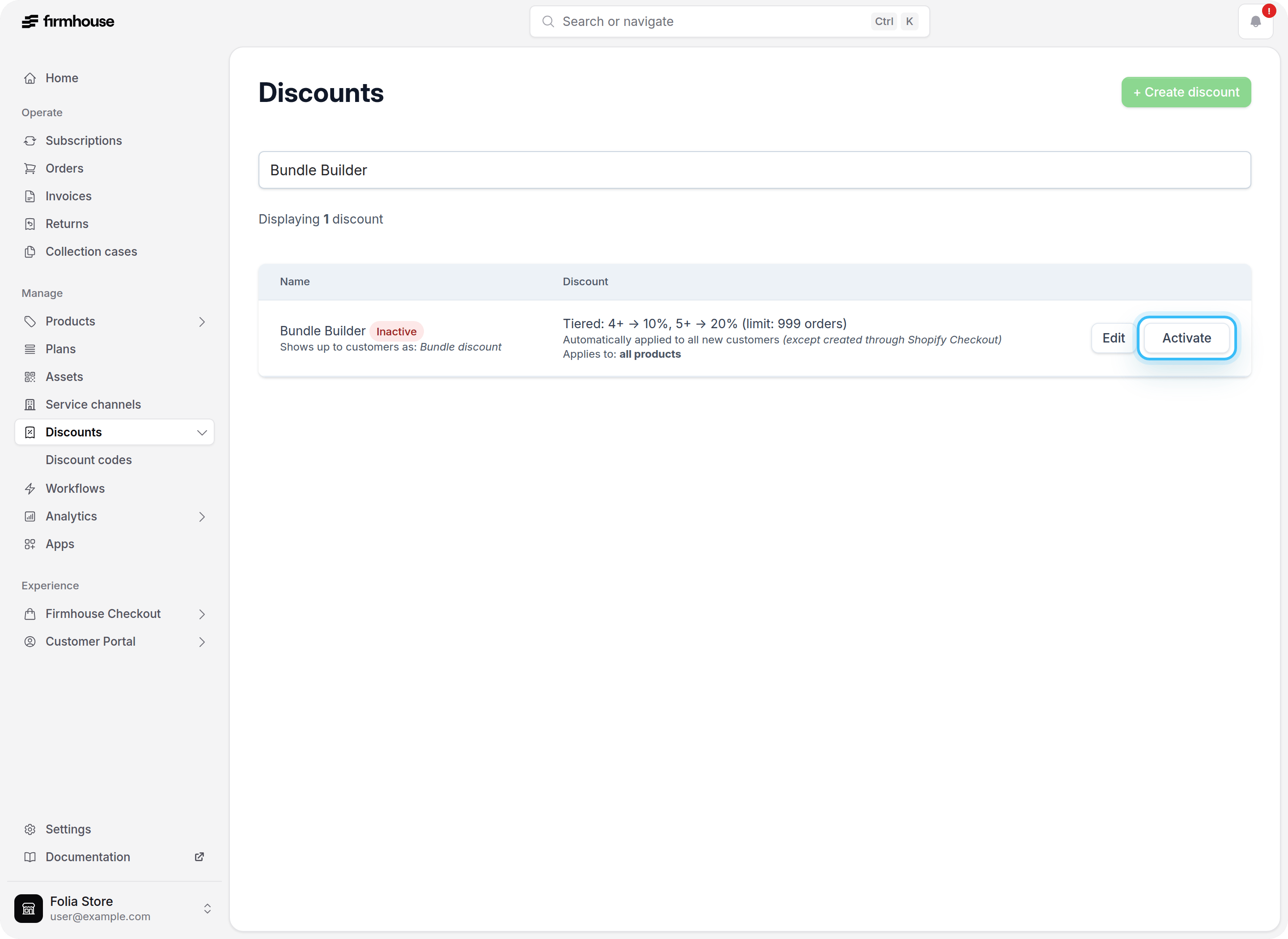
## 3. Discount Added as Deactivated
When you first create or save a tiered discount, it is added in a **deactivated** state. This allows you to review the configuration before making it available to customers.
## 2. Choose how customers should receive the discount
Tiered discounts can work in two ways:
* **Automatic**: Enable **Automatic** so the discount applies as soon as the cart quantity matches a tier. Customers do not need to enter a code.
* **Manual with a discount code**: Keep the discount **Manual** if you want customers to enter a discount code at checkout. After saving the tiered discount, create a Firmhouse discount code for it from **Discount Codes**. The code is synced to Shopify, but it only becomes redeemable after the tiered discount is activated.
## Add one-time gifts to a tier
Each tier can also include one-time purchase gifts.
When you add a gift row to a tier, you can target:
* specific one-time purchase products
* one or more collections
If you target collections, Firmhouse uses the eligible one-time purchase products in those collections when the tier is applied.
## Test a tiered discount with a Shopify customer segment
You can use Shopify customer segments to test a tiered discount with a limited group before opening it to every customer.
1. Create a customer segment in Shopify that includes only your test customers.
2. Select that segment in the **Customer segment** field on the Firmhouse tiered discount.
3. Save and activate the tiered discount.
4. Test checkout with a customer account that belongs to the selected Shopify segment.
Only customers in the selected segment can receive the Shopify checkout discount. Remove the selected segment when you are ready to make the discount available to all eligible customers.
## 3. Discount Added as Deactivated
When you first create or save a tiered discount, it is added in a **deactivated** state. This allows you to review the configuration before making it available to customers.
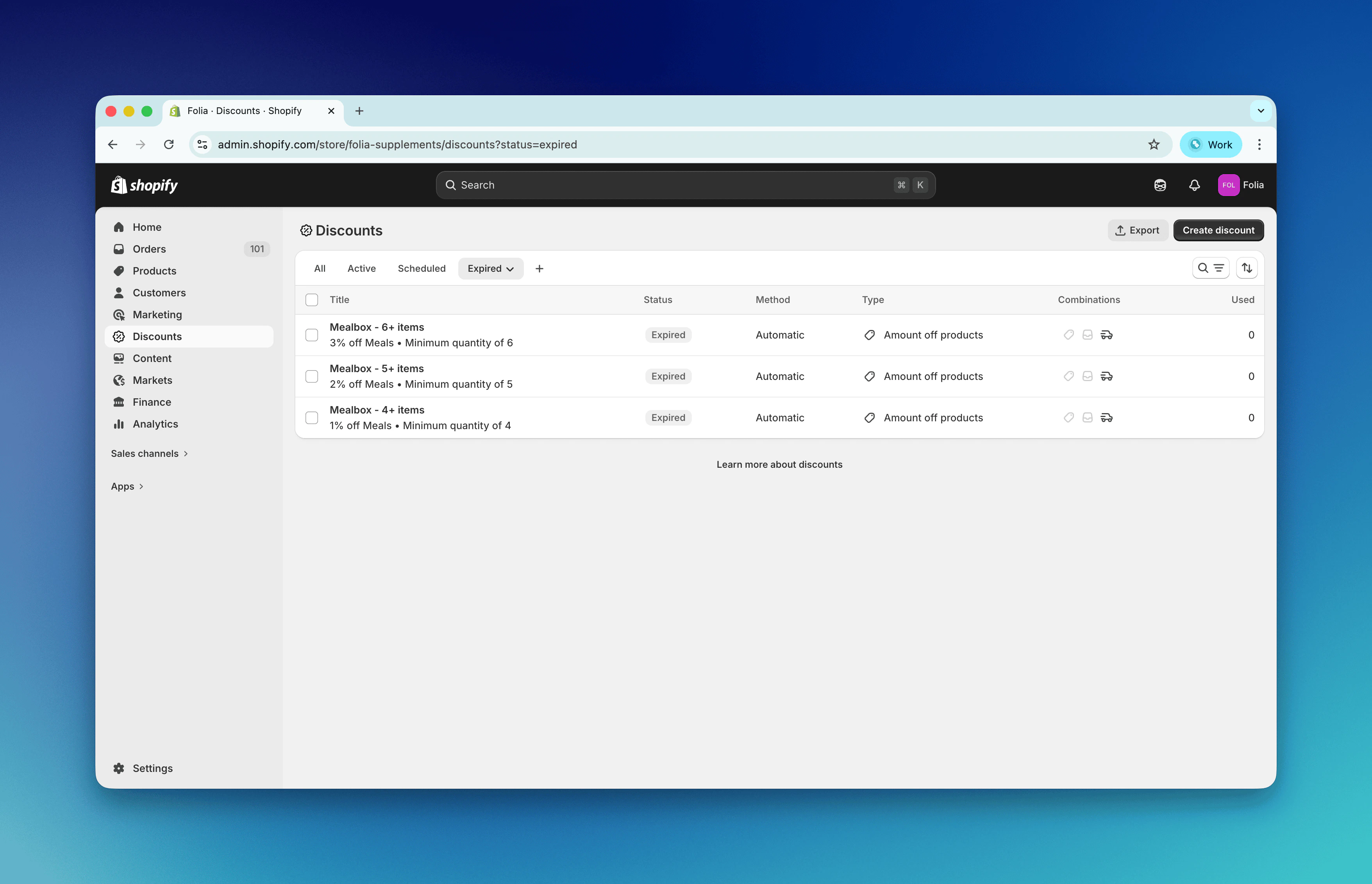
 ## 4. Deactivated Discount Synced to Shopify
Firmhouse syncs tiered discounts to Shopify as automatic discounts. The deactivated discount is synced to Shopify and appears there in a disabled state, keeping the two systems in sync.
## 4. Deactivated Discount Synced to Shopify
Firmhouse syncs tiered discounts to Shopify as automatic discounts. The deactivated discount is synced to Shopify and appears there in a disabled state, keeping the two systems in sync.
 For manual tiered discounts, create the matching discount code after the discount itself is configured. Customers can redeem that code at checkout once the tiered discount has been activated.
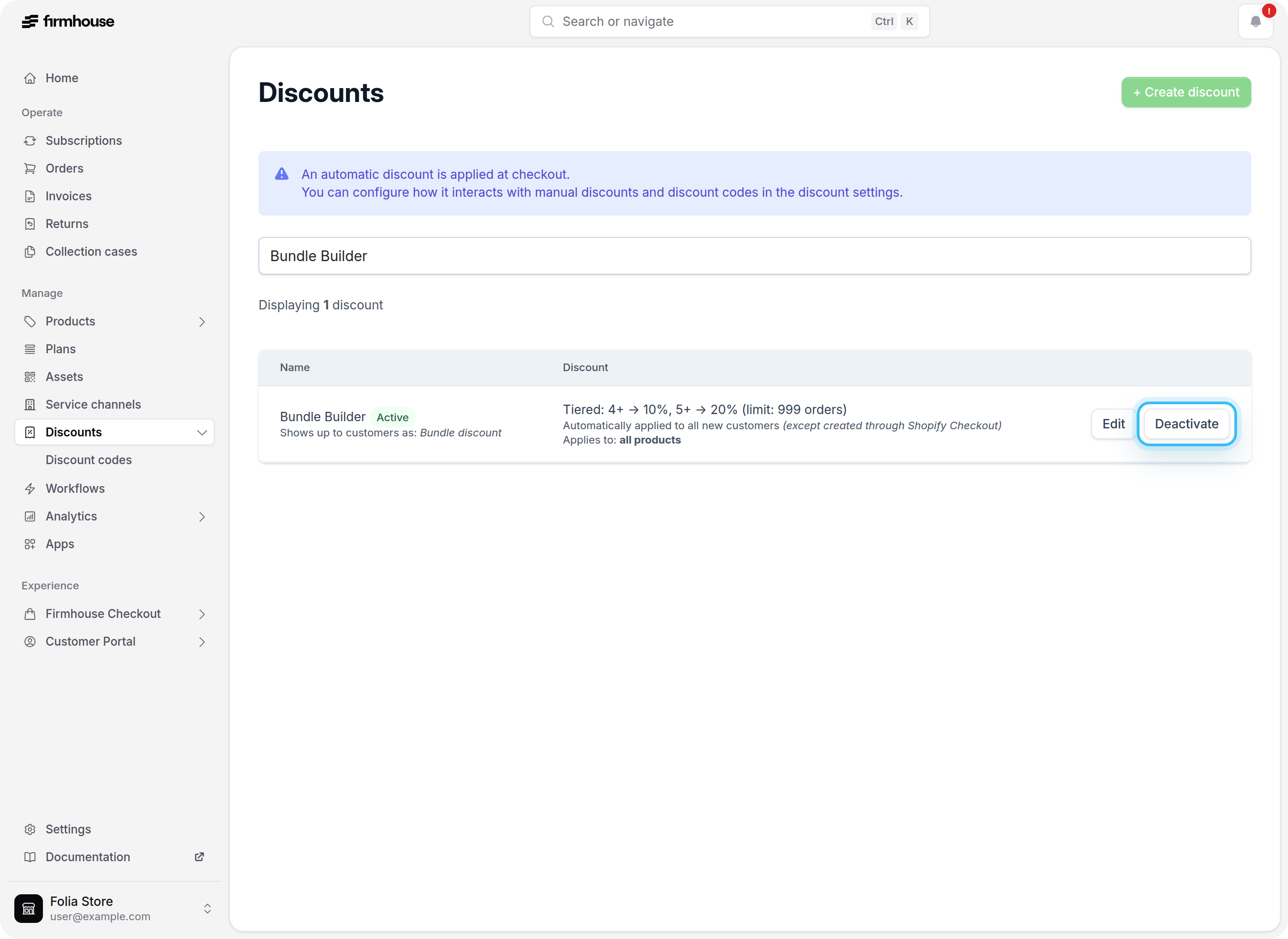
## 5. Activate the Discount in Firmhouse Portal
When you are ready to make the tiered discount available to customers:
1. Go to **Discounts** in your Firmhouse portal.
2. Find the tiered discount and click **Activate**.
For manual tiered discounts, create the matching discount code after the discount itself is configured. Customers can redeem that code at checkout once the tiered discount has been activated.
## 5. Activate the Discount in Firmhouse Portal
When you are ready to make the tiered discount available to customers:
1. Go to **Discounts** in your Firmhouse portal.
2. Find the tiered discount and click **Activate**.
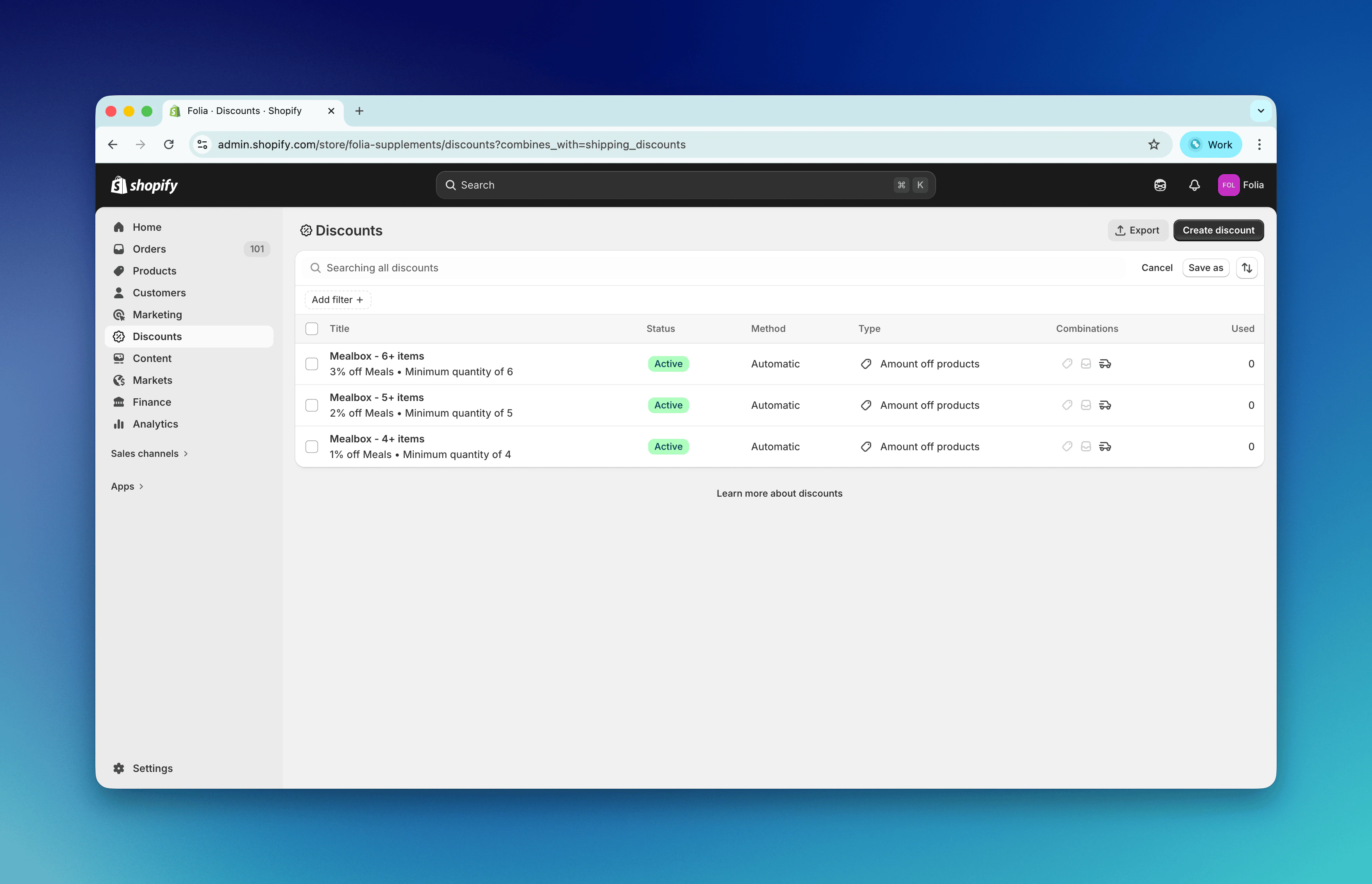
 ## 6. Activated Discount in Shopify
Once activated in Firmhouse, the discount becomes active in Shopify as well. Each tier is synced as an automatic discount with the correct percentage, minimum quantity, and collection targeting.
## 6. Activated Discount in Shopify
Once activated in Firmhouse, the discount becomes active in Shopify as well. Each tier is synced as an automatic discount with the correct percentage, minimum quantity, and collection targeting.
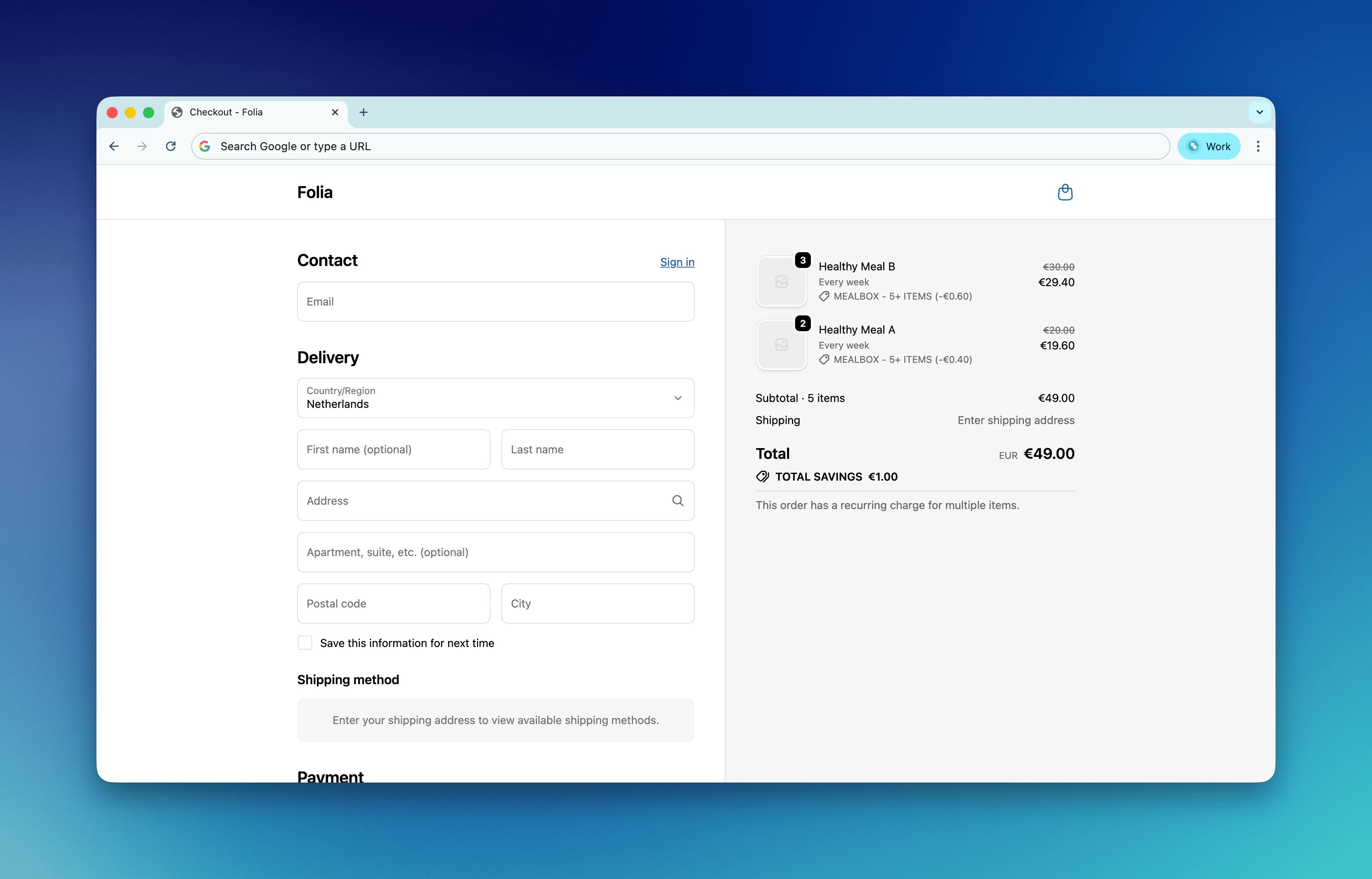
 ## 7. Discount Applied at Shopify Checkout
When customers add eligible subscription products to their cart and the quantity meets a tier threshold:
* **Automatic tiered discounts** are applied automatically at Shopify checkout.
* **Manual tiered discounts** are applied when the customer enters the Firmhouse discount code linked to that tiered discount.
## 7. Discount Applied at Shopify Checkout
When customers add eligible subscription products to their cart and the quantity meets a tier threshold:
* **Automatic tiered discounts** are applied automatically at Shopify checkout.
* **Manual tiered discounts** are applied when the customer enters the Firmhouse discount code linked to that tiered discount.
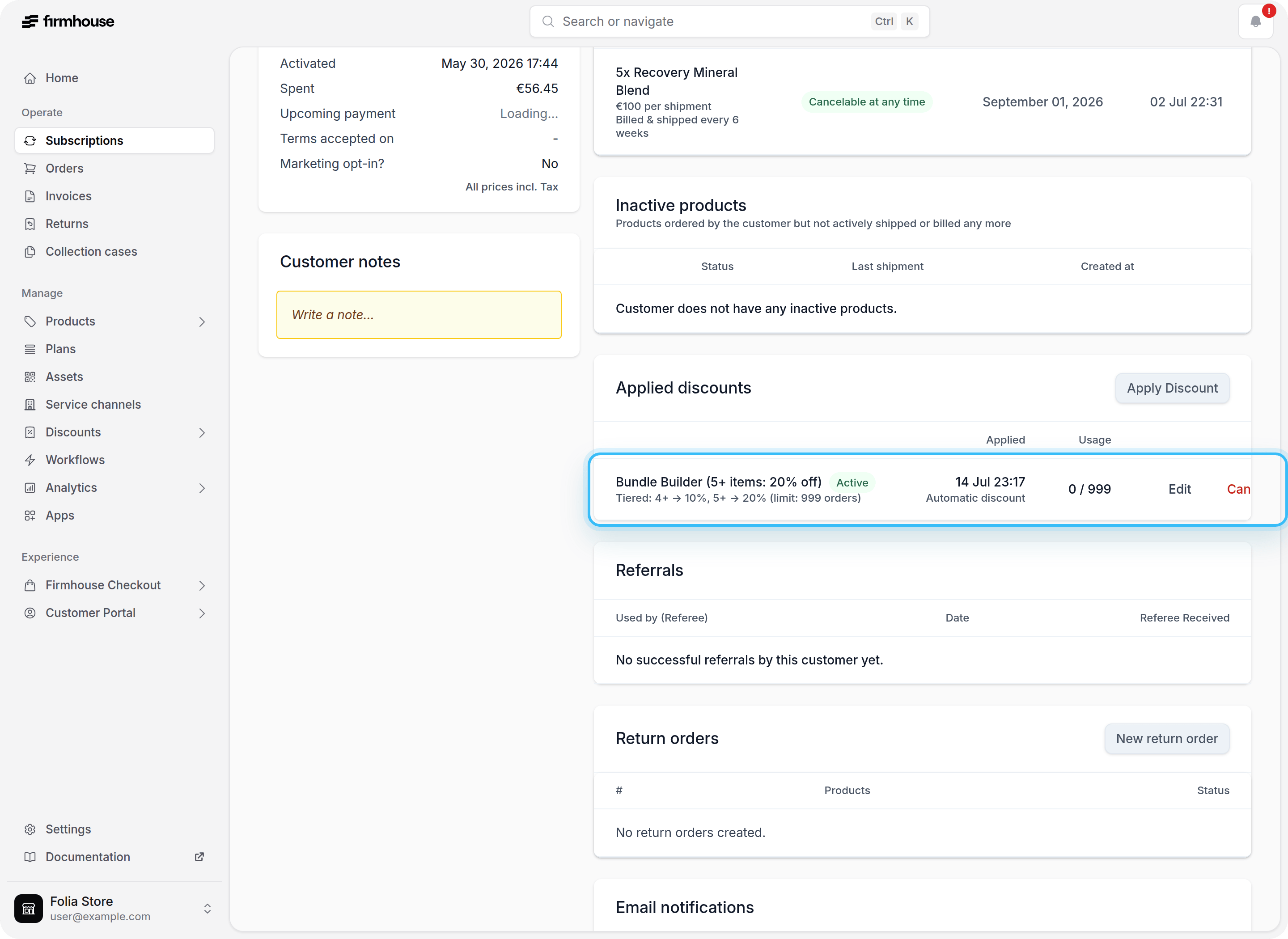
 ## 8. Discount Shown on Subscription Page After Checkout
After checkout, the subscription appears in your Firmhouse portal. The subscription page shows the discount that was applied, including the tier and percentage.
**How the calculation works:** In this example, the subscription contains 5 eligible units. That quantity reaches the 5+ item tier, so the **Bundle Builder** discount applies 20% off.
## 8. Discount Shown on Subscription Page After Checkout
After checkout, the subscription appears in your Firmhouse portal. The subscription page shows the discount that was applied, including the tier and percentage.
**How the calculation works:** In this example, the subscription contains 5 eligible units. That quantity reaches the 5+ item tier, so the **Bundle Builder** discount applies 20% off.
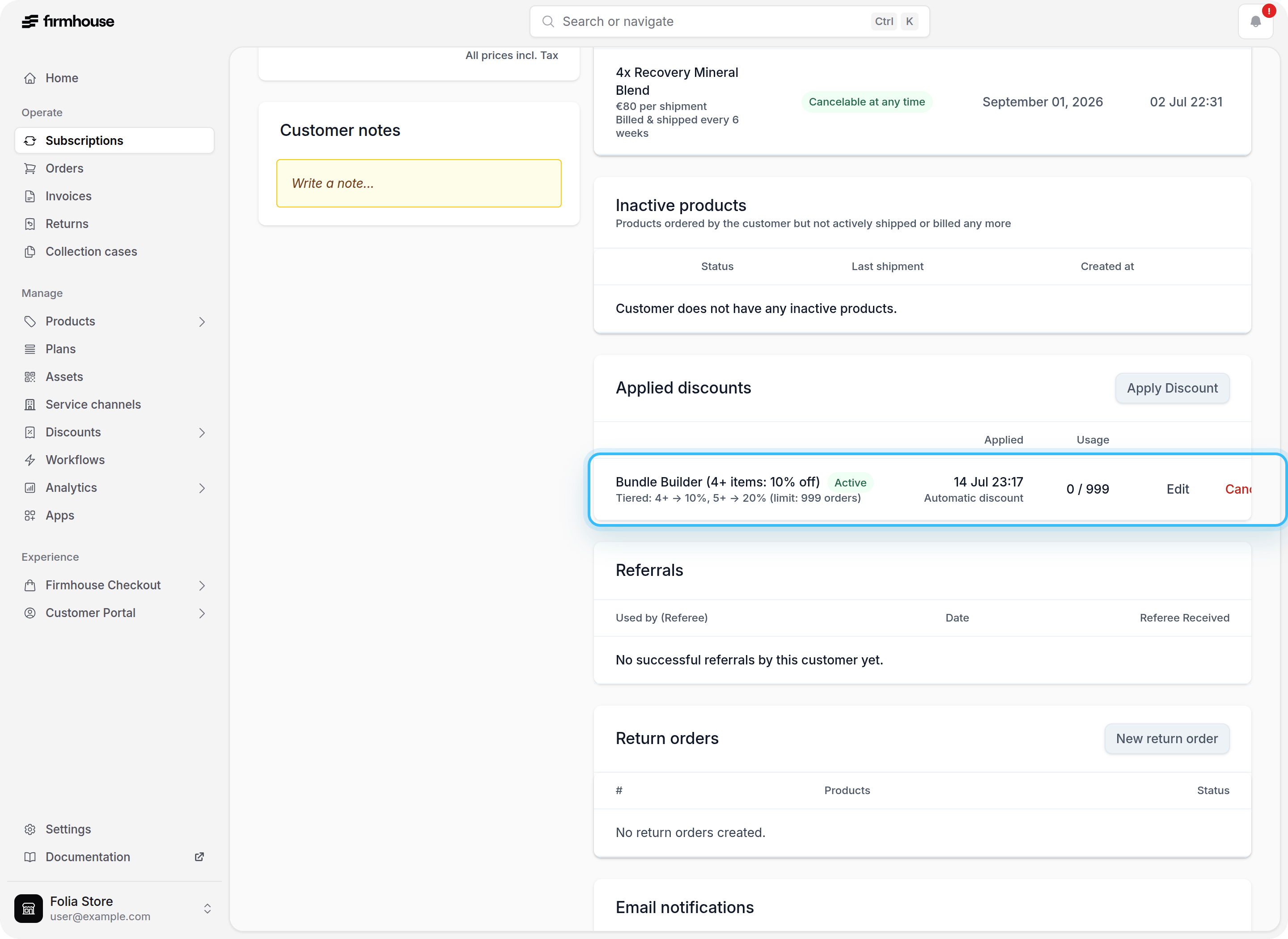
 ## 9. Discount Tier Updates When Quantity Changes
When a customer adds, removes, or updates the quantity of subscription products, Firmhouse recalculates the active tier. If the quantity now qualifies for a different tier (higher or lower), the discount is updated accordingly:
* If the subscription drops below the first tier, the discount is removed.
* If the quantity qualifies for a higher tier, the discount is updated to the new tier percentage.
The Firmhouse subscription page reflects the current discount state after any product changes.
**In this screenshot:** We updated the product quantity from 5 to 4. The subscription now qualifies for the 4+ item tier, so following orders receive 10% off instead of 20%.
## 9. Discount Tier Updates When Quantity Changes
When a customer adds, removes, or updates the quantity of subscription products, Firmhouse recalculates the active tier. If the quantity now qualifies for a different tier (higher or lower), the discount is updated accordingly:
* If the subscription drops below the first tier, the discount is removed.
* If the quantity qualifies for a higher tier, the discount is updated to the new tier percentage.
The Firmhouse subscription page reflects the current discount state after any product changes.
**In this screenshot:** We updated the product quantity from 5 to 4. The subscription now qualifies for the 4+ item tier, so following orders receive 10% off instead of 20%.
 ## Limitations and Notes
1. Tiered discounts are **percentage-based** only.
2. Tiered discounts can be configured as **automatic** or **manual with a discount code**.
3. Quantities are calculated from eligible products only.
4. If no tier matches, no tier discount is applied.
5. Shopify customer segments can be used to limit tiered discounts to specific customer groups. Leave the customer segment field empty to allow all customers.
6. Shopify automatic tier discounts are configured for both one-time purchase and subscription checkouts.
## Limitations and Notes
1. Tiered discounts are **percentage-based** only.
2. Tiered discounts can be configured as **automatic** or **manual with a discount code**.
3. Quantities are calculated from eligible products only.
4. If no tier matches, no tier discount is applied.
5. Shopify customer segments can be used to limit tiered discounts to specific customer groups. Leave the customer segment field empty to allow all customers.
6. Shopify automatic tier discounts are configured for both one-time purchase and subscription checkouts.