> ## Documentation Index
> Fetch the complete documentation index at: https://docs.firmhouse.com/llms.txt
> Use this file to discover all available pages before exploring further.
# Conversion tracking on Firmhouse Checkout
> Track e-commerce conversions and order values from the Firmhouse Checkout using data-trackable-payment-status events or post-checkout redirects.
The Firmhouse Checkout flow includes built-in support for e-commerce conversion tracking, allowing you to track conversions and order values in your analytics tools. You can track conversions using either or both of the following methods: triggering events based on the `data-trackable-payment-status` attribute, or using the dataLayer integration for detailed transaction information.
## Using the data-trackable-payment-status Attribute
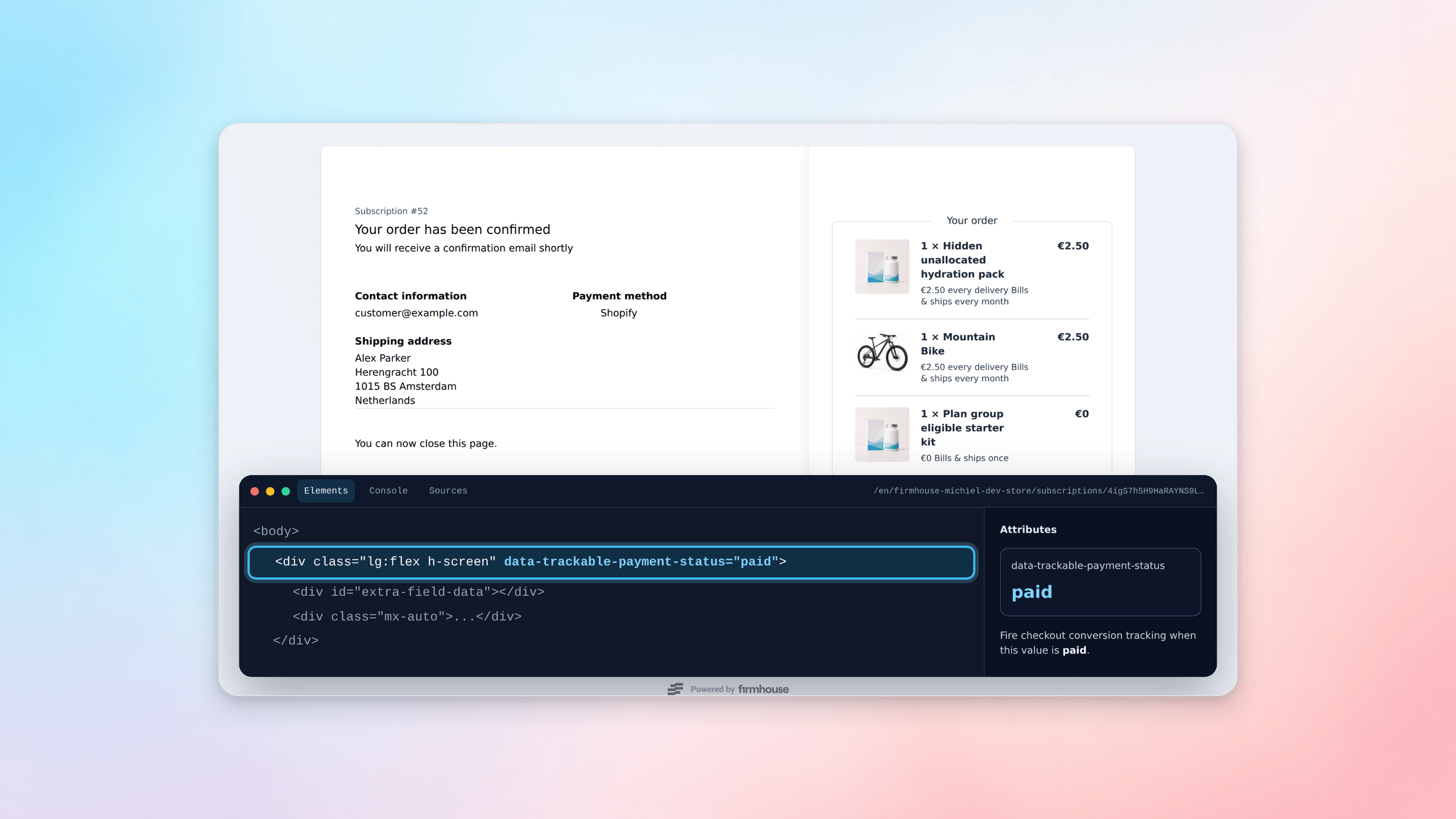
On the payment status and order confirmation pages, Firmhouse loads a `data-trackable-payment-status` attribute on one of the main page elements. The best way to fire a conversion event in your analytics setup is to trigger the event when this attribute is present and set to `paid`.
 ## Using the dataLayer Variable
Upon successful checkout of a subscription, Firmhouse automatically loads a `dataLayer` variable via JavaScript on the confirmation page. This allows you to track the conversion and its values in your tracking tools like Google Analytics or Google Tag Manager.
For more information on E-commerce tracking with Google Analytics, see the [Google Tag Manager documentation](https://support.google.com/tagmanager/answer/6107169).
Here is an example of how the `dataLayer` is populated on the checkout confirmation page:
```javascript theme={null}
window.dataLayer = window.dataLayer || [];
dataLayer.push({
'transactionId': 'INVOICE000001',
'transactionTotal': 12.1,
'transactionTax': 2.1,
'transactionAffiliation': 'Your Firmhouse Project Name',
'ecommerce': {
'currencyCode': 'EUR'
},
'transactionProducts': [
{
'name': 'A product or plan',
'category': 'subscription/product/shipping/discount/initial',
'price': 12.1,
'quantity': 1,
'sku': 'ABC1234'
}
]
});
```
The dataLayer includes the transaction ID (invoice number), total amount, tax amount, your project name, currency code, and details about each product in the transaction including name, category, price, quantity, and SKU.
## Tracking Conversions with Meta Pixel
If you have added the Meta (Facebook) Pixel tracking script to your checkout, you can measure conversions using the transaction information exposed in the dataLayer.
### Steps
1. Navigate to **Checkout > Preferences > body** in your Firmhouse project settings.
2. Add the following script to the body field:
```html theme={null}
```
This script checks if the dataLayer is available, extracts the currency code and transaction total, and fires a Meta Pixel Purchase event with this data.
## Using the dataLayer Variable
Upon successful checkout of a subscription, Firmhouse automatically loads a `dataLayer` variable via JavaScript on the confirmation page. This allows you to track the conversion and its values in your tracking tools like Google Analytics or Google Tag Manager.
For more information on E-commerce tracking with Google Analytics, see the [Google Tag Manager documentation](https://support.google.com/tagmanager/answer/6107169).
Here is an example of how the `dataLayer` is populated on the checkout confirmation page:
```javascript theme={null}
window.dataLayer = window.dataLayer || [];
dataLayer.push({
'transactionId': 'INVOICE000001',
'transactionTotal': 12.1,
'transactionTax': 2.1,
'transactionAffiliation': 'Your Firmhouse Project Name',
'ecommerce': {
'currencyCode': 'EUR'
},
'transactionProducts': [
{
'name': 'A product or plan',
'category': 'subscription/product/shipping/discount/initial',
'price': 12.1,
'quantity': 1,
'sku': 'ABC1234'
}
]
});
```
The dataLayer includes the transaction ID (invoice number), total amount, tax amount, your project name, currency code, and details about each product in the transaction including name, category, price, quantity, and SKU.
## Tracking Conversions with Meta Pixel
If you have added the Meta (Facebook) Pixel tracking script to your checkout, you can measure conversions using the transaction information exposed in the dataLayer.
### Steps
1. Navigate to **Checkout > Preferences > body** in your Firmhouse project settings.
2. Add the following script to the body field:
```html theme={null}
```
This script checks if the dataLayer is available, extracts the currency code and transaction total, and fires a Meta Pixel Purchase event with this data.