> ## Documentation Index
> Fetch the complete documentation index at: https://docs.firmhouse.com/llms.txt
> Use this file to discover all available pages before exploring further.
# Custom checkout domain on Cloudflare
> Configure Cloudflare for a custom Firmhouse Checkout domain, including disabling Rocket Loader and other optimizations that break checkout scripts.
When running Cloudflare in front of your custom Firmhouse Checkout domain, you need to disable certain Cloudflare optimizations that interfere with Firmhouse functionality. Specifically, Rocket Loader must be disabled for your checkout domain to ensure everything works correctly.
The simplest option is to disable Rocket Loader for the entire domain. If you need Rocket Loader elsewhere, use a Configuration Rule to disable it only for your Firmhouse checkout hostname.
## DNS proxying
Start with the checkout domain set to **DNS only** in Cloudflare. This lets the CNAME point directly to the Firmhouse-hosted application without Cloudflare proxying the traffic.
If you want to turn on Cloudflare proxying for the checkout domain, coordinate this with Firmhouse support first. Firmhouse needs to verify the custom domain mapping and certificate setup on the hosting side before proxied traffic is enabled. Turning on the proxy before that is confirmed can cause SSL or routing issues.
## Disabling Rocket Loader
### Steps
1. Go to your Cloudflare dashboard
2. Select your domain and navigate to **Speed** > **Settings**
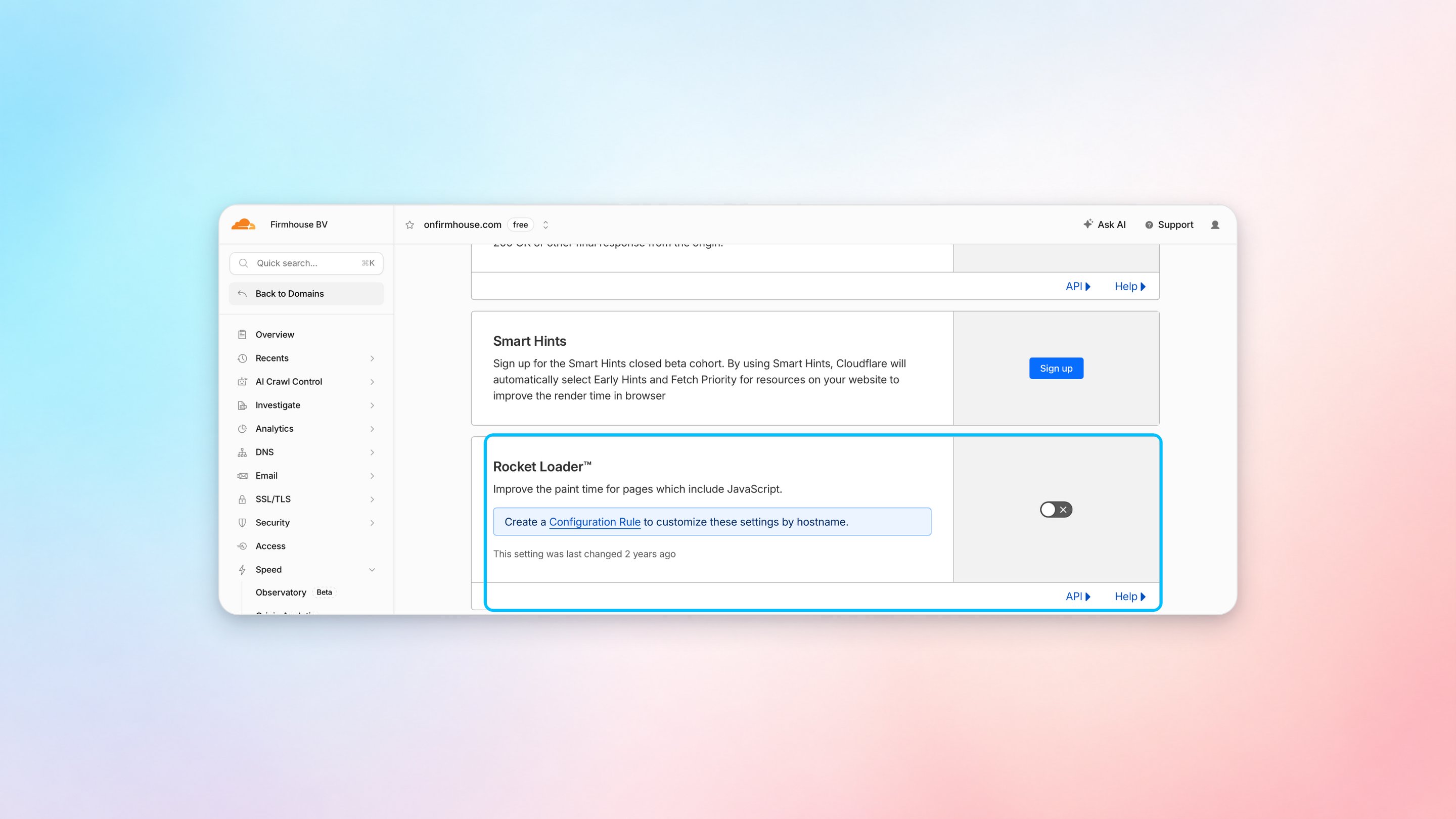
3. Under **Content Optimization**, find **Rocket Loader** and switch it off
 ## Search engine indexing
Firmhouse serves a `robots.txt` file on connected custom checkout and Customer Portal domains. You can customize this file when you want search engines to crawl specific pages, such as a customer login page that should appear in search results.
Go to your custom domain settings in Firmhouse and update the `robots.txt` content for that domain. For example, if you want crawlers to access the index page on the connected domain, make sure your rules do not block the whole site with `Disallow: /`.
## Creating a Configuration Rule (Alternative)
If you want to keep Rocket Loader enabled for other parts of your site, you can create a configuration rule to disable it specifically for your checkout domain.
### Steps
1. Go to your Cloudflare dashboard
2. Select your domain and navigate to **Rules** > **Overview**
3. Click **Create rule** and choose **Configuration Rule**
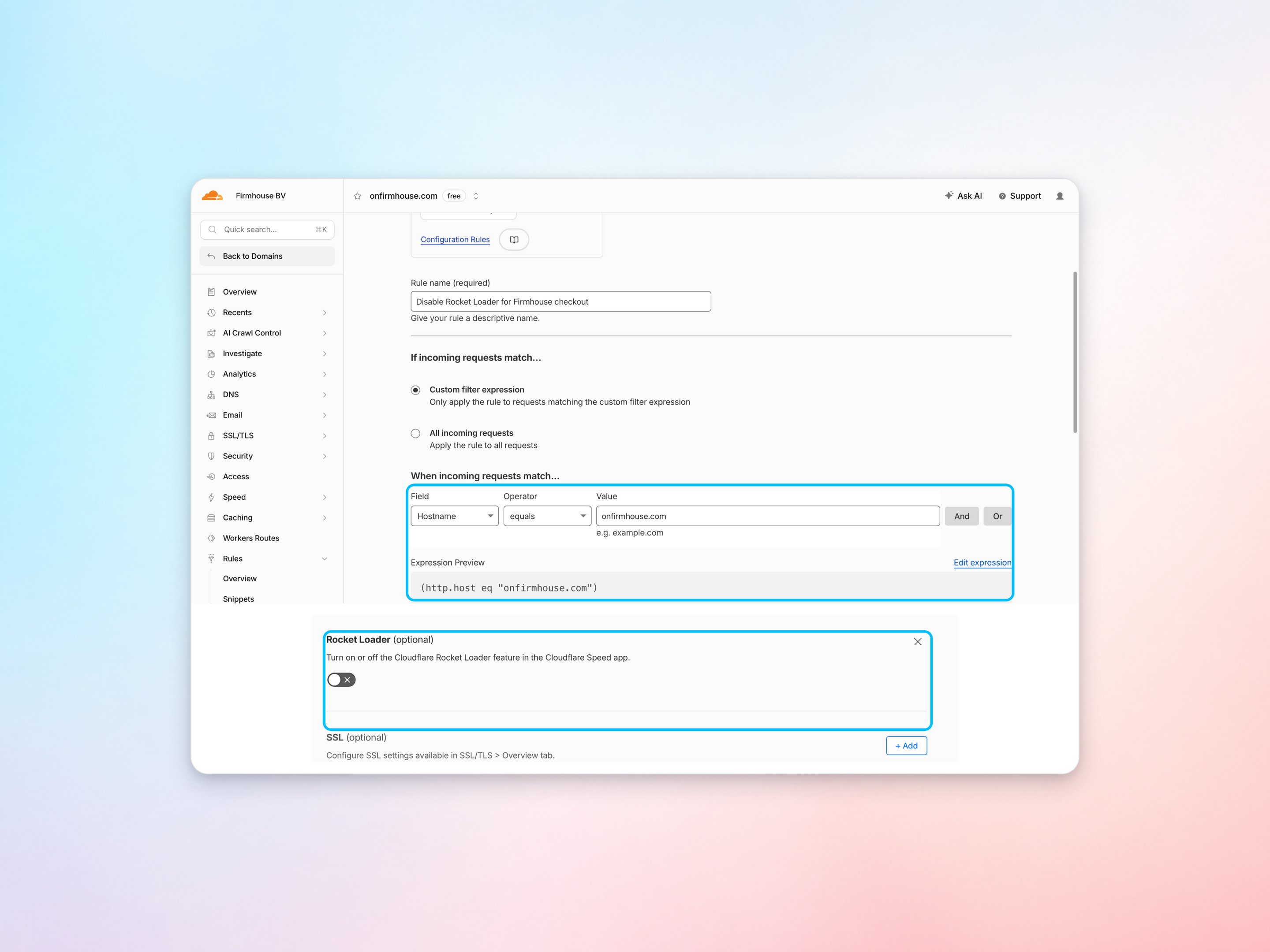
4. Set the rule name, for example, "Disable Rocket Loader for Firmhouse checkout"
5. Under **If incoming requests match**, select **Custom filter expression** and configure **Hostname** to equal your checkout domain
6. Under **Then the settings are**, add **Rocket Loader** and switch it off
7. Save the rule as a draft or deploy it when you are ready
## Search engine indexing
Firmhouse serves a `robots.txt` file on connected custom checkout and Customer Portal domains. You can customize this file when you want search engines to crawl specific pages, such as a customer login page that should appear in search results.
Go to your custom domain settings in Firmhouse and update the `robots.txt` content for that domain. For example, if you want crawlers to access the index page on the connected domain, make sure your rules do not block the whole site with `Disallow: /`.
## Creating a Configuration Rule (Alternative)
If you want to keep Rocket Loader enabled for other parts of your site, you can create a configuration rule to disable it specifically for your checkout domain.
### Steps
1. Go to your Cloudflare dashboard
2. Select your domain and navigate to **Rules** > **Overview**
3. Click **Create rule** and choose **Configuration Rule**
4. Set the rule name, for example, "Disable Rocket Loader for Firmhouse checkout"
5. Under **If incoming requests match**, select **Custom filter expression** and configure **Hostname** to equal your checkout domain
6. Under **Then the settings are**, add **Rocket Loader** and switch it off
7. Save the rule as a draft or deploy it when you are ready