

Manual order confirmation
When an order is pending (for example, waiting for payment or manual processing), you can confirm it manually from the admin portal. This is useful when you’ve resolved a payment issue outside the normal flow, completed manual processing, or the customer has paid via bank transfer.Where to find it
The Confirm action is available in two places:- Order detail page: Open the order and click Confirm in the actions area
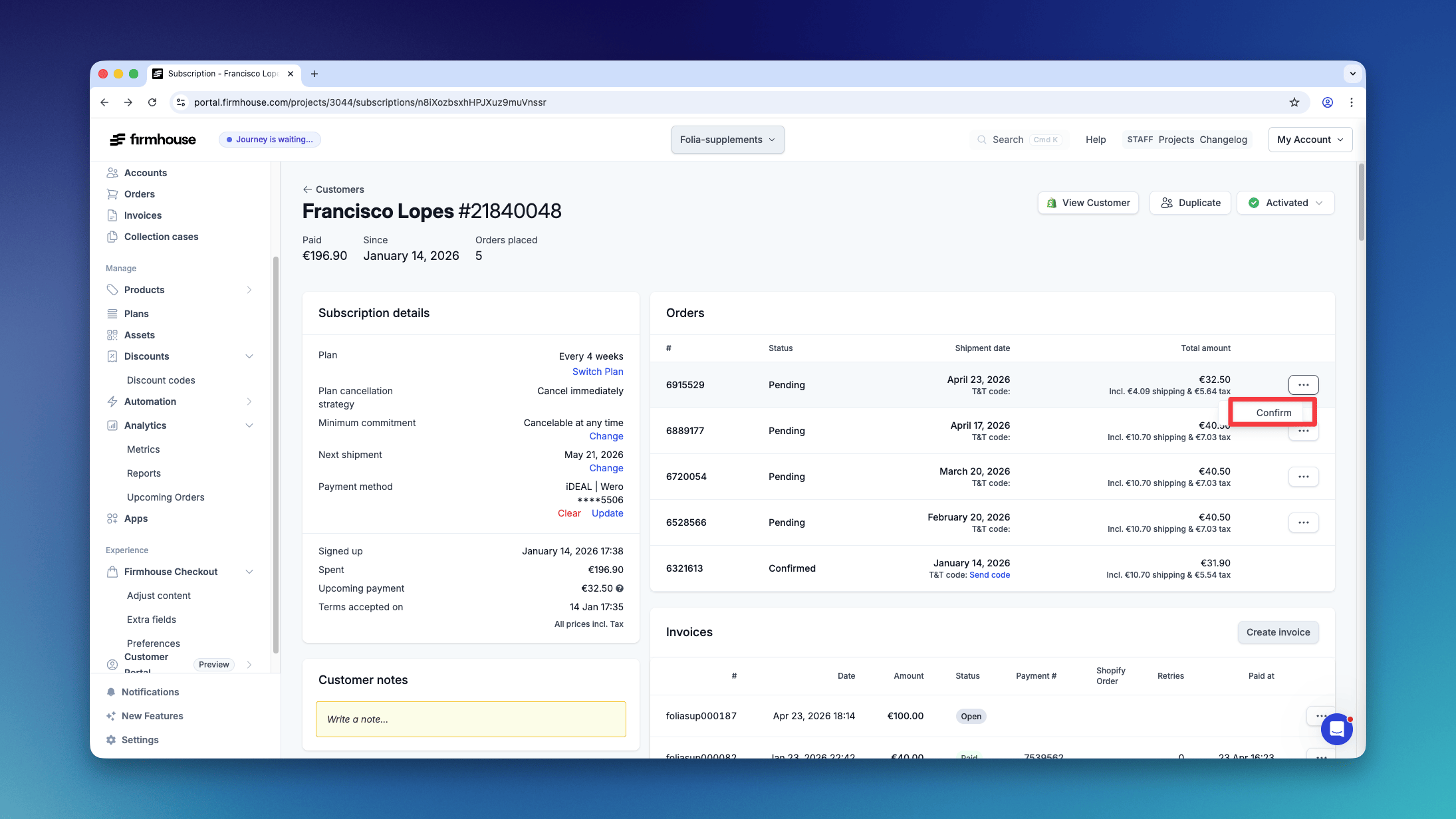
- Subscription page: In the orders table, use the dropdown menu on a pending order and select Confirm
Choose whether to process billing
The confirmation dialog defaults to Confirm only. This confirms the order without creating an invoice or attempting a payment, for example when you have already collected payment separately. For an order-based order with no existing invoice or payment and an available billing method, you can also choose to process billing. The option describes what will happen:- Confirm and create invoice for a free order or a subscription set to pay by invoice. No automatic payment is attempted.
- Confirm and schedule payment when your project uses a payment delay.
- Confirm and attempt [amount] payment when payment will be attempted immediately.
Confirm orders through the API
UseconfirmOrder when your integration should confirm an order and process billing if eligible. It queues billing for an order-based order with no existing invoice or payment and an available billing method. Use updateOrder with status CONFIRMED when you only want to update the status without starting billing.
Cancel an order after a failed payment
When an order is still pending because its payment failed, you can cancel it from the admin portal. This is useful when the order should no longer be shipped or retried. You can only cancel an order this way when its payment has failed and the order is still pending. Fulfilled or already cancelled orders cannot be cancelled this way. The Cancel order action is available in two places:- Order detail page: Open the order and click Cancel order in the actions area
- Subscription page: In the orders table, use the dropdown menu on a pending order with a failed payment and select Cancel order
Shopify order cancellations
When an order is cancelled in Shopify, Firmhouse automatically marks the matching order as cancelled too. This keeps the order status aligned between Shopify and Firmhouse, so teams can avoid shipping or following up on orders that were already cancelled in Shopify. Firmhouse only cancels orders that have not already been fulfilled. If the Firmhouse order is fulfilled or already has a fulfillment timestamp, it keeps its fulfilled status.Ship products immediately
From a customer’s subscription page, you can create an order immediately in two ways:- Use Ship now at the top of the Active products section to ship all active products and pull the subscription’s billing cycle forward.
- Open an individual product’s actions menu and select Ship now to create an order containing only that product. For an eligible recurring product on a non-Shopify subscription, select Move the schedule forward to replace its next recurring shipment or Send an extra shipment to leave its schedule unchanged. With One frequency for all products, the shared schedule can advance when the selection includes all products due to ship together, such as a subscription with one recurring product. Shipping only part of that group creates an extra shipment. Shopify individual shipments always leave the schedule unchanged.
Automatic inclusion of one-off add-ons
When orders are created, one-off add-on products are automatically included. These are products that have been added to a subscription with the one-off add-on type.How it works
- One-off add-on products are automatically pulled into regular subscription orders when they’re created
- This happens for both native subscriptions and Shopify contracts
- The products don’t need a shipment date - they’re included whenever the next order is generated
- After the order is created, the one-off add-on is automatically removed from the subscription
Order creation
Orders are created in several ways:- Scheduled orders: When a subscription’s scheduled shipment date arrives, an order is automatically created
- Ship all active products: When you manually pull the subscription’s billing cycle forward
- Shopify billing attempts: When a Shopify subscription contract triggers a billing attempt