

skip_shop_pay=true checkout parameter.
This article explains the original problem, what Firmhouse now does to prevent it, and how to recover subscriptions that were affected before this fix.
Problem summary
The issue happens when all of the following are true:- A customer adds a product with a SEPA-based subscription plan to their cart
- The customer proceeds to Shopify Checkout
- The customer is already logged into Shop Pay
- Shopify presents Shop Pay as the active or default payment method
Why this happens in Shopify Checkout
When a customer is already authenticated with Shop Pay, Shopify may preselect Shop Pay immediately during checkout. That behavior happens on the Shopify side. For SEPA-based subscriptions, this can result in the initial checkout finishing with Shop Pay active, while no usable recurring payment method is saved onto the subscription itself. If you want more background on how SEPA recurring payments work after the first checkout payment, see Recurring Charges (SEPA) and Local Payment Methods (iDEAL/SEPA).How Firmhouse prevents this for two-button checkout setups
As of April 7, 2026, Firmhouse automatically hides Shop Pay on the Shopify Checkout page when the customer arrives through the “Check out with iDeal/Bancontact” button in a two-button checkout setup. This applies to non-Plus Shopify stores that use a separate checkout button for local payment methods like iDeal or Bancontact alongside the standard “Buy now” or cart checkout button. When a customer clicks the iDeal/Bancontact checkout button, Firmhouse ensures that Shop Pay is not presented as a payment option on the checkout page. This means the customer can only select a supported SEPA-compatible payment method, preventing the broken-mandate scenario described above.Custom checkout buttons and storefront flows
If your Shopify storefront uses a custom checkout button or custom cart flow, you need to apply the same prevention yourself when sending customers to Shopify Checkout for local payment method subscriptions. For the checkout button that should lead customers to iDEAL | Wero, Bancontact, Pay by Bank, Trustly, or another SEPA-compatible local payment method, redirect customers to Shopify Checkout withskip_shop_pay=true in the URL:
& instead:
Shopify Plus stores
For Shopify Plus stores that use a single checkout button, this automatic prevention is not yet available. Shopify Plus merchants still have three options:Option 1: Use a separate local-payment checkout path
If your Shopify Plus store uses a custom cart or checkout choice before redirecting customers to Shopify Checkout, send customers who choose local payment methods to:Option 2: Disable Shop Pay on your store
If you disable Shop Pay in Shopify, customers will no longer see it as a payment option during checkout. That removes this specific failure mode for SEPA subscription signups and forces customers to choose another available payment method that can be used with the subscription.Option 3: Keep Shop Pay enabled
If Shop Pay is important for conversion on your store, you may decide to keep it enabled. In that case, some customers can still start a SEPA subscription through Shopify Checkout with Shop Pay selected. Those subscriptions may then be created in a broken state and require recovery later.What happens if a subscription was started with Shop Pay
If a subscription was started with Shop Pay before this fix, or on a Shopify Plus store where the automatic prevention is not yet available, the subscription may have no usable recurring payment method stored. In that case, the next recurring charge will fail. This does not mean the subscription is permanently lost, but it does mean the customer needs to complete a recovery step so a supported recurring payment method can be attached.How Firmhouse helps recover affected subscriptions
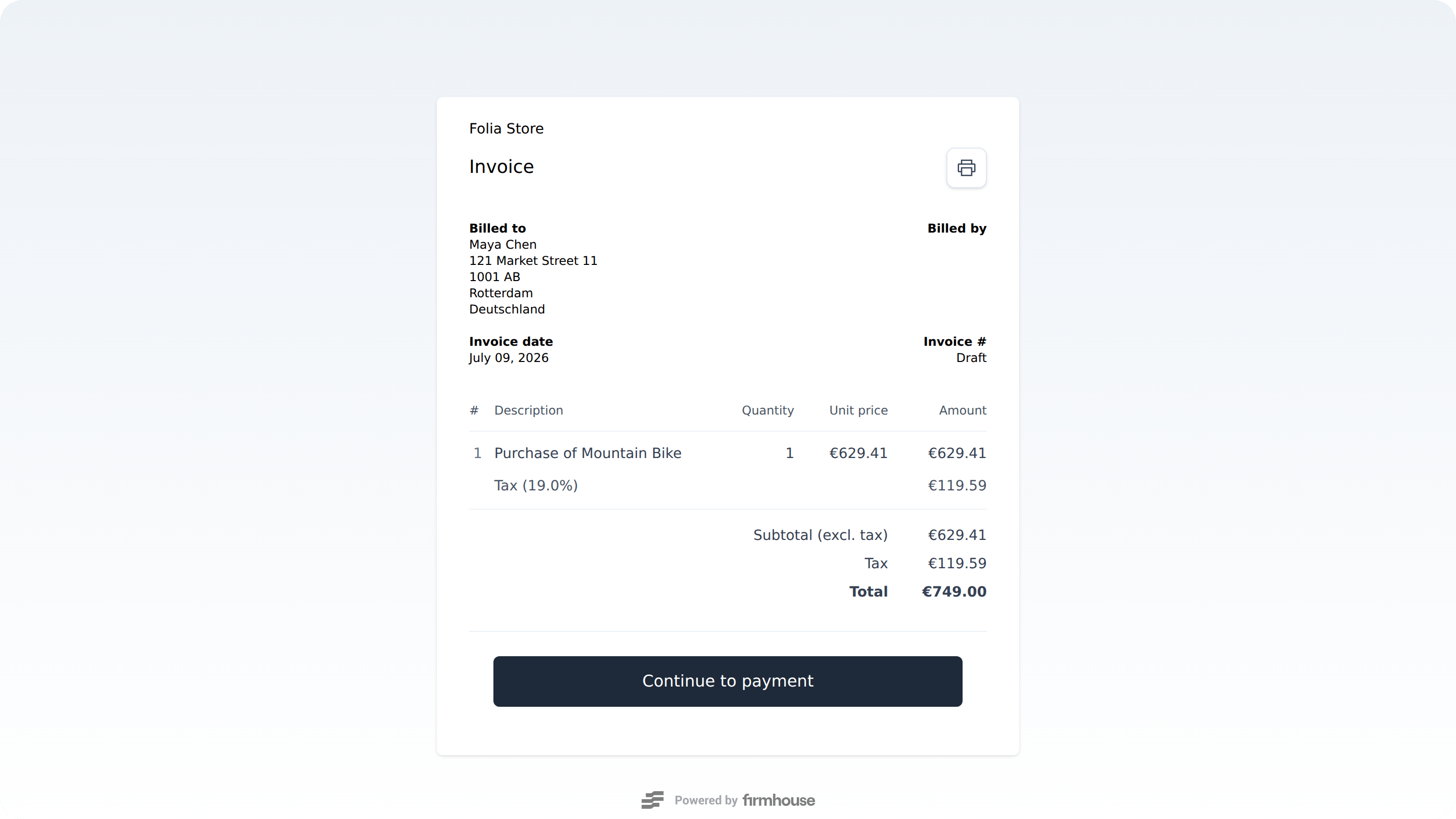
Firmhouse already includes recovery flows that help merchants and customers resolve this situation.1. Customer-facing recovery via the invoice payment page
When the recurring payment fails, you can notify the customer and direct them to the invoice payment page usingpay_now_url.
This URL is already available in Firmhouse email templates and Klaviyo events. In practice, this usually means:
- Your default Firmhouse payment-failure emails already include the link
- Your Klaviyo flow can include the same link if you use Firmhouse events there
2. Admin-facing recovery via an authorization payment link
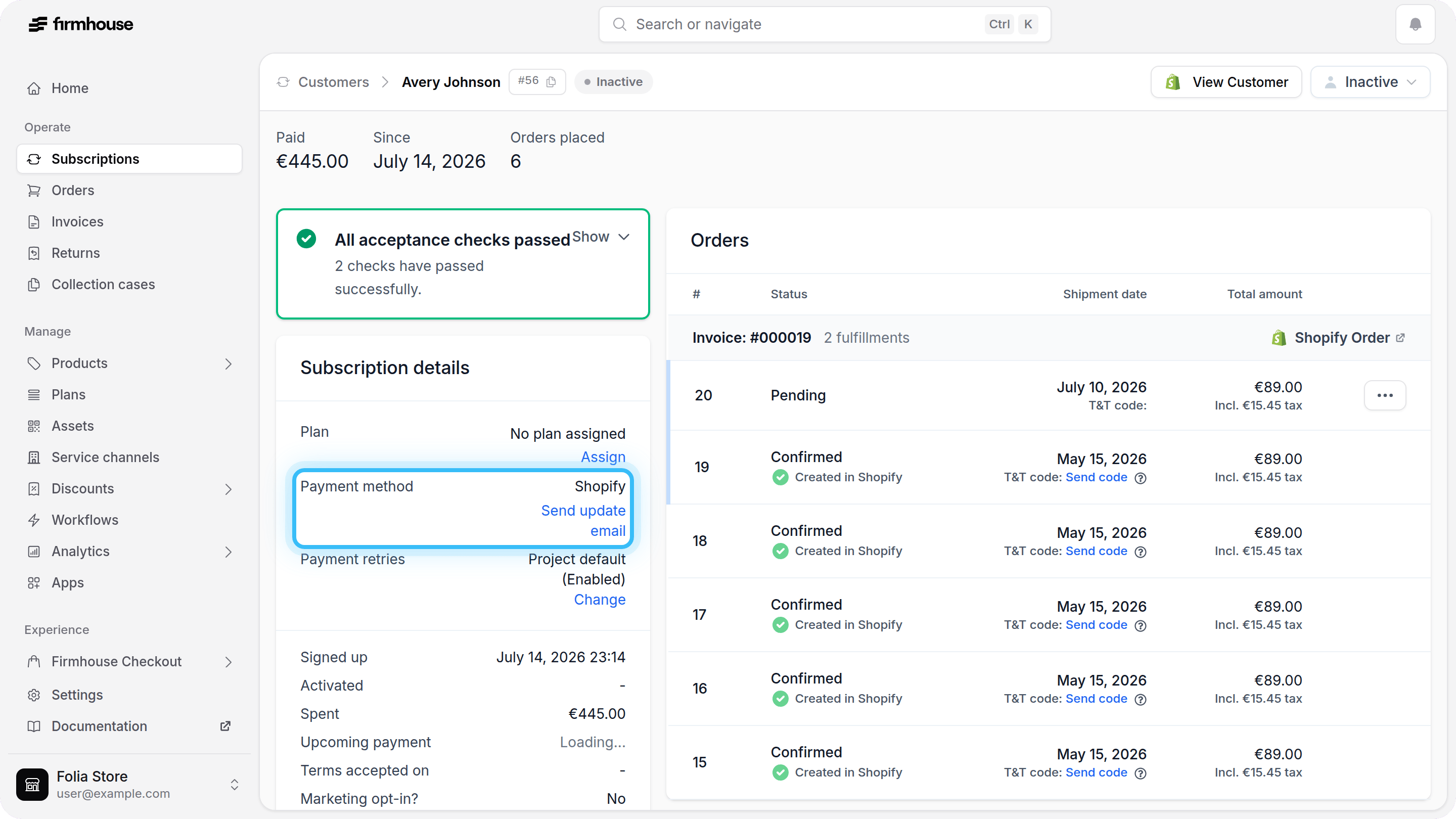
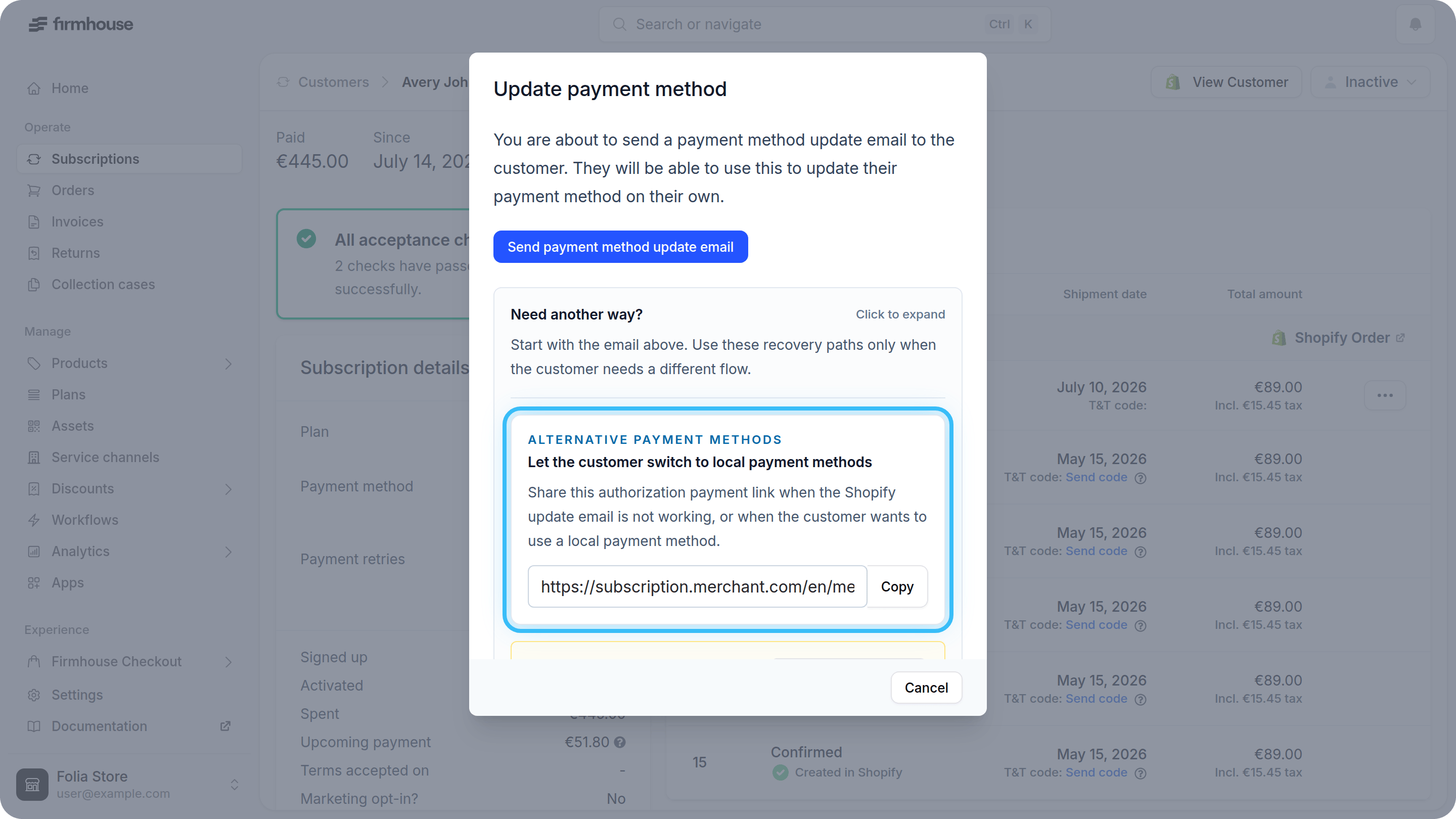
Firmhouse also includes an admin-side recovery option for supported provider setups. To find this link in the Firmhouse Portal:- From the sidebar in the Firmhouse Portal, go to Subscriptions or Customers
- Find and open the subscription you want to recover
- In the Payment method section, click Send update email
- In the modal, expand Share an authorization payment link
- Copy the Update payment method link and send it to the customer by email or chat
What merchants should configure now
Even with the automatic Shop Pay prevention in place for standard two-button setups, it is good practice to have your recovery communication ready in case any subscriptions were affected before the fix, or if you use a custom checkout flow that does not yet addskip_shop_pay=true to its local-payment checkout redirect.
We recommend that you:
- Review your failed-payment and outstanding-invoice emails in Firmhouse
- Confirm that your templates or Klaviyo flows include
invoice.pay_now_url - Test the payment-failure path so your team knows what the customer will receive
- Make sure the payment methods you want customers to use for recovery are enabled on your linked payment provider
What Firmhouse is working on next
The automatic Shop Pay prevention for two-button checkout setups was released on April 7, 2026. Firmhouse is continuing to work on:- Making Shop Pay prevention easier to apply in more custom Shopify checkout setups
- Proactively notifying customers that their payment method has become unavailable before the next recurring order is attempted, so they can correct it earlier