Setting Up Stripe
Steps
- Locate an API key in your Stripe dashboard or create a new public API key and secret API key.
- Create a Stripe endpoint secret as described below.
Creating a Webhook for All Events
Go to https://dashboard.stripe.com/webhooks and create a webhook that points to the URL that’s shown in the Firmhouse portal. Stripe will then provide you with a “Stripe Endpoint Secret.” The webhook events to enable in Stripe are:charge.succeededcharge.failedcharge.pendingcharge.refundedcharge.refund.updatedcharge.dispute.closedpayment_intent.succeededpayment_intent.payment_failedsource.chargeablesource.failed
Configuring Stripe in Firmhouse
Steps
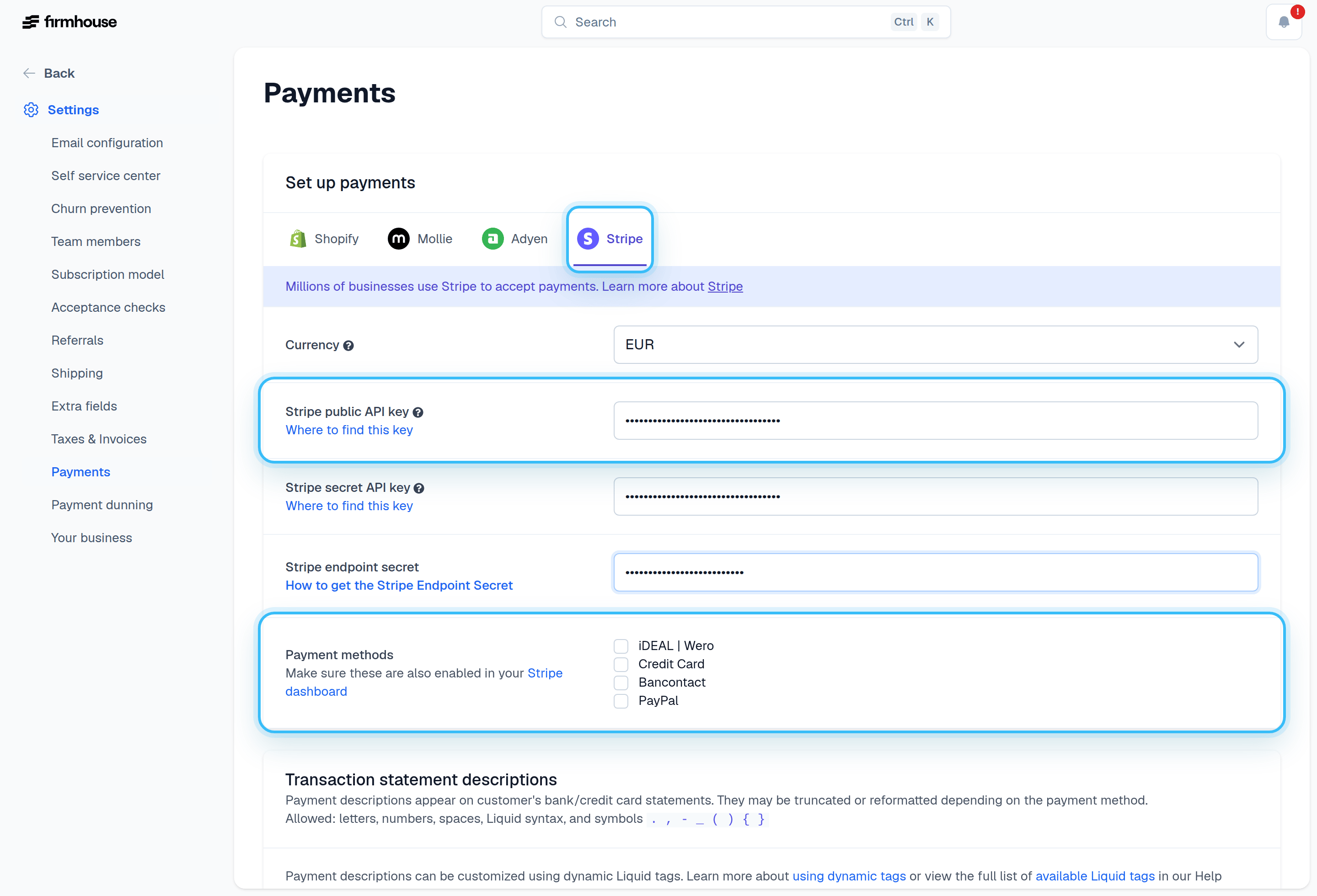
- In your Firmhouse project, navigate to Settings > Payments.
- Select Stripe as your payment provider.
- Select the currency you want to use.
- Add your Stripe public API key.
- Add your Stripe secret API key.
- Add the Stripe endpoint secret from the webhook you created.
- Enable the desired payment methods (iDEAL | Wero, credit cards, etc.).