Benefits of Using Shopify Shipping Rates
When Shopify shipping rates are enabled, you can take advantage of all the shipping rate rules you’ve set up in Shopify, including country-based shipping rates that apply different rates for different countries you’re shipping to, product-based shipping rules that add or remove shipping based on which products are in an order, and free shipping thresholds that apply free shipping when certain products or the order value is above a certain amount.When Shipping Costs Are Fetched from Shopify
Firmhouse fetches shipping rates from your Shopify store at three important moments. At checkout, Firmhouse fetches the shipping rate and costs when a customer opens the checkout page. This ensures customers see accurate shipping costs based on their location and cart contents. At recurring order generation, whenever Firmhouse charges for and generates a new recurring order, it updates the shipping costs from your Shopify shipping rates. This means if you’ve changed your shipping rates in Shopify, the new rates will apply to future orders. On subscription changes, when a customer updates their shipping address or the composition of their subscription products, Firmhouse recalculates shipping costs. This ensures that any price calculations for future orders are accurate in advance.Refreshing Missing Rates in Bulk
When active subscriptions are missing a Shopify shipping rate, Settings > Shipping shows a review list. The Fetch new rates action retries those subscriptions using their current products and delivery addresses. The refresh can only store rates that Shopify currently returns as applicable. Subscriptions remain in the review list when their Shopify shipping profile, destination, products, or rate conditions still do not produce an applicable rate. Correct that Shopify configuration before retrying; Firmhouse does not charge shipping on recurring orders while a legacy Shopify shipping rate remains missing.Recover an order blocked by shipping costs
When Shopify shipping costs block an order, open the related project notification and expand its details. The message explains what needs attention; View full payload provides technical details if needed.- Check the subscription’s delivery address and that Shopify has an applicable shipping rate for its products. If the alert identifies unavailable products, reconnect them to available Shopify variants or replace them on the subscription.
- After correcting the setup, choose Retry recurring order in the notification and confirm. This can create and charge the order.
- Check the subscription and notifications for the result. Recurring-order recovery uses the original captured shipment date and products so the overdue shipment can still be fulfilled.
How the Right Shipping Rate Is Selected for Recurring Orders
This section describes the legacy Shopify shipping-rate selector. Projects using Shopify Delivery Options preserve typed shipping, local delivery, and pickup choices with stricter matching and a shipping-only fallback. See Use Shopify Delivery Options.
Step 1: Match by Shipping Rate Handle
Firmhouse first checks if the subscription already has a shipping rate handle stored from a previous order or checkout. If a rate with that exact handle exists in the available rates from Shopify, it is selected immediately. This is the most reliable matching method because handles are unique identifiers assigned by Shopify to each shipping rate.Step 2: Match by Monta Shipper and Shipping Options
If your store uses Monta for fulfillment, Monta embeds its ownshipper and shippingoptions fields inside the shipping rate handle in Shopify. Firmhouse extracts these fields and compares them against the current subscription’s shipping rate.
If a match is found based on the same Monta shipper and shipping options combination, that rate is selected. This ensures that even if Shopify regenerates handles, the correct Monta shipping method is preserved.
Step 3: Fall Back to the Cheapest Available Rate
If neither the handle nor Monta fields produce a match, Firmhouse checks whether the subscription has a previously stored shipping rate title. On a brand new subscription with no saved handle, title, or price, Firmhouse picks the cheapest available shipping rate returned by Shopify. If saved data contains an unmatched handle or price but no title, Firmhouse selects only a unique same-price option in the subscription currency; otherwise it leaves the rate unresolved.Step 4: Match by Exact Title
If the subscription does have a previously stored shipping rate title, Firmhouse looks for an exact match (case-insensitive) among the available rates. If found, that rate is selected.Step 5: Match by Price
Firmhouse compares the previously saved price with current Shopify rates in the subscription currency. It selects a rate only when exactly one option has that price. This includes free shipping rates with a price of zero. Checking the price before partial titles prevents a generic saved title such asShipping from selecting a more expensive rate such as B2B Shipping.
Step 6: Match by Containing Title
If the saved price does not identify one rate, Firmhouse looks for a rate whose title contains the previously stored title and whose price still matches. For example, if a customer originally signed up with the shipping rateDHL - Afhaalpunt and your Shopify settings later expose the same-price rate as Pickup Points | DHL - Afhaalpunt, Firmhouse recognizes that the new rate contains the original title and selects it. When multiple same-price rates contain the original title, the shortest one is selected to avoid false matches.
Step 7: Match by Similar Title
If the price and containing title do not identify one current rate, Firmhouse attempts to find the best matching rate by title similarity. This handles situations where shipping rate names change slightly over time in your Shopify configuration. Firmhouse uses word-based similarity scoring. This compares individual words in the rate titles and selects a rate only when one option has the strongest non-zero overlap, accounting for both shared words and word order. If Shopify returns shipping rates but multiple rates have the same saved price, or no rate matches by handle, Monta identity, title, or price, Firmhouse does not guess. The operation is blocked without creating an order or changing the shipment date, and the project receives a notification with a retry action. If Shopify explicitly returns an empty shipping-rate list, Firmhouse preserves the legacy behavior: it clears the saved Shopify rate and continues without a shipping line. This is different from receiving rates that cannot be matched safely, which remains blocked. If Shopify is temporarily unavailable, Firmhouse can continue with an unchanged saved legacy rate only when that exact rate was previously confirmed for the subscription’s current currency by a successful Shopify refresh. Otherwise, the operation follows the same blocked notification and recovery flow.What Products Are Used for Calculating the Shipping Rate
Shipping costs are calculated based on the products that are included in the next order. At checkout, shipping costs are based on all the products that should be shipped immediately. Any product set up as “ship later” will not be included in the shipping cost calculation. For subscription changes and recurring order generation, shipping costs are based on all the products for the next immediate order. Products that have a shipping date later than the upcoming order will not be included in the shipping cost calculation.Exempting Individual Subscriptions from Shipping Costs
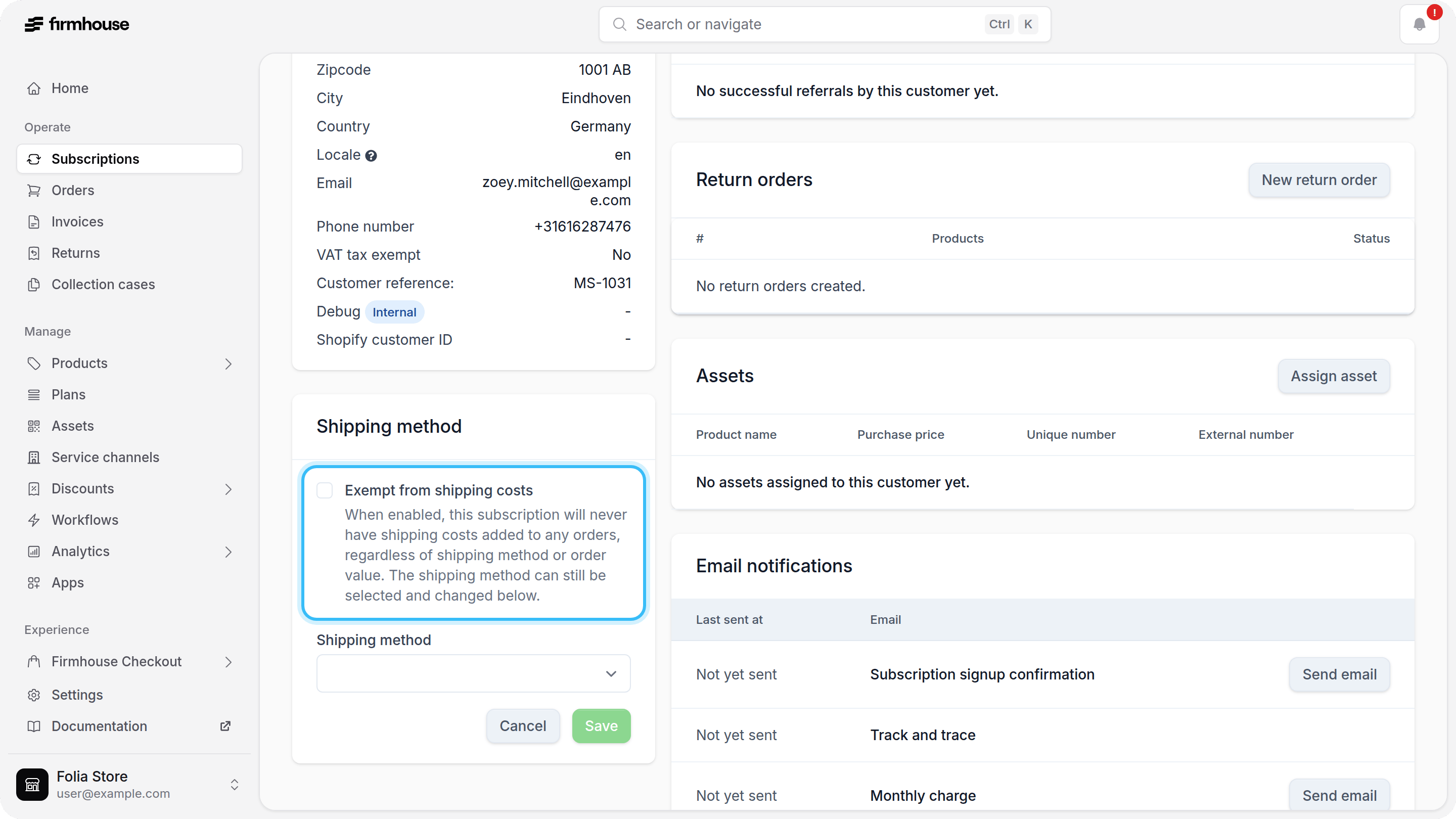
You can exempt specific subscriptions from shipping costs entirely. This is useful for VIP customers, promotional offers, or special circumstances where you want to provide free shipping to individual subscribers. To exempt a subscription from shipping costs, go to the subscription in the Firmhouse portal, navigate to the Shipping method, click on Edit, and check the “Exempt from shipping costs” option.Let Customers Change Their Shipping Method
You can let customers choose another Shopify shipping rate for their subscription in the Self Service Center and Customer Portal v2.- Go to Settings > Self Service Center.
- Under Customers can modify their subscription, enable Change shipping method.
- Click Save changes.